

This is the second part of an ongoing series called “Birds On A Budget”. It really should be “Can You Do Wildlife Photography On A Limited Budget?”, but that’s not as catchy or succinct.
TLDR
When looking for secondhand cheaper alternatives for wildlife photography it is all too easy to get preoccupied with specifications sheets without looking at the whole picture. It can mean that just because Camera X does have a specific feature that Camera Y has then it must be inferior. Well let’s look at an example.

The cameras I’ve chosen to look at are the Canon EOS 80d and the Sony A6500. Both were introduced in 2016, both have 24Mp sensors, and both can be found second hand for about the same price. The 80d is a DSLR and is probably considered retro-tech now and the A6500 being mirrorless is seen as the more up to date technology. Let’s see how the specs compare.
| Sony A6500 | Canon EOS 80d | |
| Introduced | December 2016 | February 2016 |
| Resolution | 24 Megapixels | 24 Megapixels |
| Camera type | Mirrorless interchangeable lens camera | DSLR |
| Sensor size | APSC (23.5 x 15.6mm) | APSC (22.5 x 15mm) |
| In Body Image Stabilisation | Yes | No |
| ISO range | 100-256,000 which can be extended to 512,000 | 100-16,000 which can be extended to 25,600 |
| Dynamic Range | 13.67 EV | 13.17 EV |
| Autofocus |
|
|
| Rear LCD panel | Tilting 3 inch touch screen with 921,600 dots | Fully articulating 3 inch touch screen with 1,040,000 dots |
| Viewfinder | Electronic viewfinder with 100% coverage with 1.07 magnification (0.71 x 35mm) and 2,359,296 dots. | Optical viewfinder with 100% coverage at 0.95 magnification. |
| Shutter speed range | 30 sec – 1/4000 sec | 30 sec – 1/8000 sec plus ‘B’ |
| Built in flash | Yes | Yes |
| Flash synchronisation speed | 1/160 sec | 1/250 sec |
| Frames per second | 11 frames per second in both mechanical and electronic shutter modes with no live view and 8 fps with live view. | 7 frames per second using the optical viewfinder and 2.4 fps when using live view. |
| Buffer |
|
When using the optical viewfinder:
When using live view:
|
| Metering modes |
|
|
| Video | Available codecs AVCHD, XAVCS, H264, MP4
|
Available codecs MPEG-4, H264 with a choice of all I or IPB
|
| Storage | SD card (UHS-1) | SD card (UHS-1) |
| Connectivity |
|
|
| Battery | NP-FW50 battery with CIPA rating of 350 | LP-E6N battery with a CIPA rating of 960 |
| Weather sealing | Yes | Yes |
| Construction | Magnesium alloy | Composite construction with an alloy chassis with plastic shell |
| Weight | 453g | 730g |
| Dimensions | 120 x 67 x 53mm | 139 x 105 x 79mm |
| Other functions | Inbuilt Timelapse function |
On the whole the Sony seems the better camera as it has an electronic viewfinder that provides realtime exposure feedback, better video capabilities, better ISO range, better dynamic range and In Body Image Stabilisation (IBIS) all in a smaller and lighter package.
Sony A6500 real world usage

The A6500 body is not overly small, but the button and dial placements leave a little to be desired. There are twin control dials but they are both on the rear of the camera meaning your thumb has to do double duty. To me the lack of a front dial around or near to the shutter button is a big handicap. Now when it comes to using Sony cameras this is not my first rodeo. I have an A7r and A7r ii so I am quite familiar with the idiosyncrasies of the menu system. But, having said that I still find them labyrinthine and illogically laid out and the paucity of physical buttons and dials means that menu diving on the A6500 is quite frequent.

There is only one SD slot on the A6500 and although I prefer 2 slots it is not a big consideration. The SD card slot is located in the battery compartment and this is major pain. Even when shooting handheld it is fiddly to change cards and shooting on a tripod makes it downright frustrating. Often I find myself having to take the battery out to access the SD card. Speaking of the the battery compartment the battery in itself is hopeless. If I go out for the day shooting photos then I have to take 2 spares and if I intend to shoot any video I take at least 4. Luckily they are readily available and reasonably priced.

The LCD EVF on the left side of the body is good – for its time it is nice and detailed while being responsive. The rear LCD is of the flip up variety. I prefer the fully articulated type but it’s no big deal and I can work with both. The quality of the screen is abysmal – it is very hard to see in bright sunshine and it becomes very dim when shooting 4K video making it all but useless. Sony claims it is a touch screen but it is very limited in function. It can only be used for selecting AF points and nothing else and the implementation of that is pretty poor as it is laggy when working well and down right unresponsive when it isn’t. I’ve been in situations where I’m repeatedly touching the screen and the focus point is not moving meaning I’ve lost the shot.
Speaking of autofocus it works very well. Having AF points spread over the whole sensor is great which means you can really concentrate on composition. The AF is very quick and locks on moving subjects. Another nice feature is that you can link spot metering to the active AF point. The electronic shutter is another feature that I really like and although the rolling shutter is quite pronounced when shooting moving subjects I like to use it with shy wildlife as it means I won’t disturb it. In Body Image Stabilisation (IBIS) is fantastic. While not as good as that on other cameras I’ve used (Olympus and Panasonic) it works well and is very welcome when shooting handheld video.


Image quality is impressive. Shooting RAW the files are very malleable in processing as long as you get your exposure right. The high ISO performance is quite impressive and the dynamic range is such that I don’t feel the need to blend exposures to get details in the shadows and highlights when shooting scenes with a high subject brightness range. When shooting video the story is a little complicated. The 4K is nice and detailed and looks very good, but it is only 8-bit and so can’t be pushed too much in post. The provision of flat profiles SLOG 2 and 3 is good to have when shooting contrasty scenes outside. Shooting HD the footage is softer and doesn’t look so good. It’s OK but I prefer to shoot 4k and downsize to HD on export. Focus peaking, zebras, and a live histogram are features that make shooting video easier and it is good to see them on the A6500.

All these points are well documented so why did I get the A6500? Well I’d switched from Canon full frame cameras to a Sony A7r ii a couple of years ago and I’ve really enjoyed the whole experience. Initially I was using adapted lenses but gradually I switched over to native Sony EF mount lenses with the exception of my 150-600mm. Just for giggles I started doing some bird photography with the A7r ii and I found myself using the crop mode a lot which gave me a 15 Mp image. After 18 months of doing this I thought well why not get a second hand A6500 and have a quicker camera that has electronic shutter and more importantly has 24 Mp. I was also toying with the idea of shooting more wildlife video and the A6500 fit the bill for that as well. Overall I persevere with the A6500 because I like the final image, but it is a real effort as I just find the camera so awkward to use.


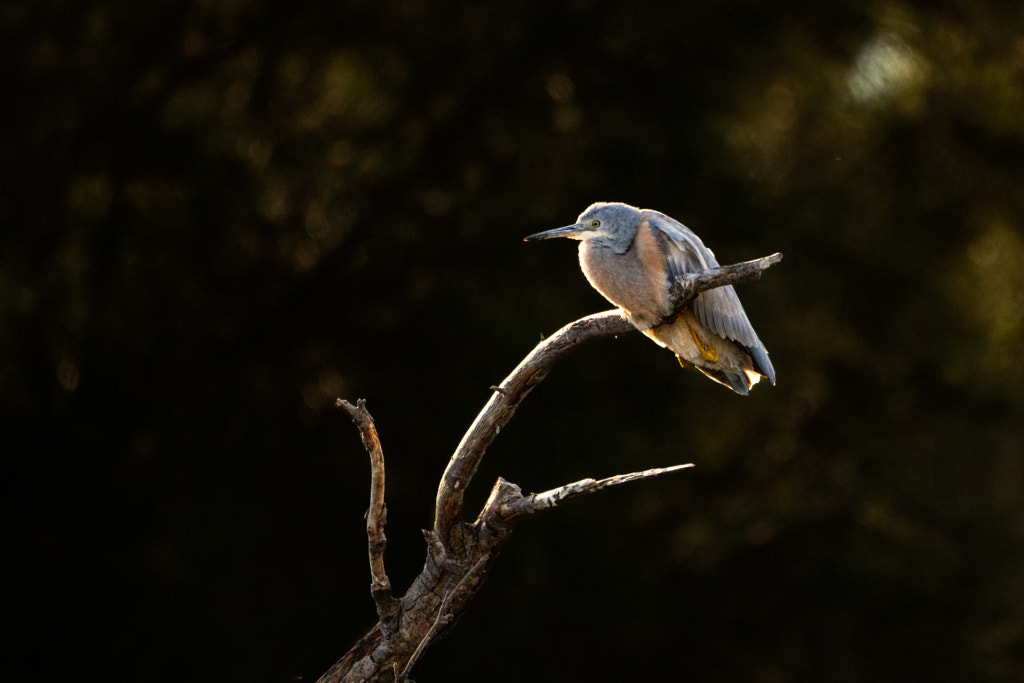
Canon EOS 80d real world use

During the later part of the Film Age (1822 to 2000) I used Olympus OM4s, but by 2003 I could no longer get them repaired and my father-in-law generously gave me a Canon EOS3 SLR. Whenever I pick up any Canon camera from the EOS 650 introduced in 1987 to the Canon EOS 5d iv introduced in 2016 I feel immediately familiar with the control layout, the handling and the operation of the camera. Canon, for all their faults, of which there are many, has always produced well sorted nice handling cameras. The 80d is no different. The camera fits perfectly in the hand, the buttons and dials are well laid out and intuitive to use. This attention to the user experience extends to the camera menus which are simply and logically laid out.

Like the Sony A6500 there is only one card slot, but it is positioned on the side of the handgrip behind its own door. It is easy to access under all scenarios. The battery is the venerable Canon LP-E6 and it lasts forever. Sure this is partly down to the fact that SLRs draw less power than mirrorless cameras, however, it is also gutsier at 7.2V, 1800mAh and 13Wh compared to 7.4V, 1080mAh and 7.3Wh of the Sony NP-FW50 which is in the A6500. The upside of this is that I’ve rarely used more than one battery for a full day of shooting.

The optical viewfinder is nice and large and clear. Although I now prefer EVFs because of the realtime exposure feedback the 80ds viewfinder is very pleasant to use. The rear LCD screen is of the fully articulated flippy flappy type which I really like not just for shooting video but also for shooting landscapes and macro in the vertical orientation.The screen has a teensy-weeny bit more resolution than the A6500s, but more importantly it is bright and clear when using in bright sunlight. It is also a touchscreen – you can control the camera, go through the menus and review images with it. While there is no joystick to select autofocus points you can use the screen to do this and it is responsive. While we’re talking about autofocus it helps to view it as two cameras in one body. Using it as a SLR with the optical viewfinder the 45 AF points are all centrally grouped. If when composing an image your subject is outside of that area then you have to focus and recompose. The autofocus is quick and with a well calibrated lens very accurate. When using the rear LCD screen in “Live View” the performance is like a mirrorless camera with every pixel on the sensor doing double duty as an AF point. The 80d has face detection that works well. Although how responsive this is will depend on the lens – those with STM motors work the best. I did consider just using the camera in the live view mode but there is a significant performance hit with the maximum frames per second of 7 reduces to 2.4. I also find it hard to track birds using the rear screen and a super telephoto lens. Another much missed feature is In Body Image Stabilisation so you have to depend upon the IS in the lens if it has it.
The image quality is good – a real leap up from the 18Mp sensor that Canon seemingly used forever. But with that said it is not as good as that in the A6500. The dynamic range of the Canon 80d is 13.17EV as opposed to the 13.67EV of the Sony as measured by DXO. The amount is paltry and in real life terms negligible. If we look at ISO performance and particularly noise then both cameras are fairly equal up to ISO 800. At 1600 the A6500 is about a stop better and at 3200 is 1 1/2 stops better. The highest maximum native ISO on the 80d is 16,000 and this can be extended to 25,600. The A6500 tops out natively at 256,000 which can be extended by a stop to 512,000. In reality the highest ISOs on both cameras aren’t much chop, on the 80d the furthest I’d go is 6400 and the A6500 can be used up to 12800. But having said this I am using Topaz DeNoise AI to clean the images up. Your tolerances to noise maybe a lot lower than mine. If you shoot RAW colour output is pretty much the same, you should be able to get the results you want in post. Shooting jpgs well if you like punchy reds and warmer looking images then you’ll prefer the Canon. For video the lack of 4k can be seen as a major drawback. I shoot 4k and then in post will often crop in because I’ll output the final file as HD. The HD video on the 80d is an improvement on the previous 18 and 20Mp sensors that Canon used. It is also better than the HD from the Sony. There is no flat profile on the camera, but I solved that by installing the Cinestyle Profile from Technicolor and I am getting great results. The video output is again 8-bit so can’t be pushed around too much in post.
When shooting video the lack of an EVF is a bit of hindrance, but, thankfully the rear LCD screen is of high quality. The touch screen implementation makes operating the camera a doddle. Another feature I really like is the ability to create a ‘My Menu’ spread over three pages and I’ve made one of the pages dedicated to video. The AF in video works much better than I expected but again this is really lens dependent. While it is quick to acquire and initially lock on it does have the annoying tendency to drift off the subject and onto the background. You need to keep taping the touch screen to maintain focus on the subject. Unfortunately Canon doesn’t provide any focus peaking for help with manual focusing and no zebras to warn about clipping. Also Canon’s pre-amps are not the best.
I bought the Canon EOS 80d with the sole intention of testing cameras at various price points to see how they’d fare for nature and wildlife photography. I fully intended to sell the camera once I’d finished with it. Now having used it for several months it has become one of my favourite cameras (my favourite being the Olympus EM 1 mk ii). The 80d is such a well thought out camera that it is above all fun to use to use. No it’s not a hybrid camera as the video implementation doesn’t perform well enough, but it is certainly an excellent tool for the photographer on a budget. It has certainly piqued my interest in the 90d which addresses some of the limitations of the 80d.
Conclusion
The thing that became very apparent when using both of these cameras is that user experience plays an important part. Canon and Sony have very different design philosophies. Sony is more a technology company and looks to throw as much technology into a product without any consideration of the users experience when using it. Canon take a conservative approach to technology – nothing cutting edge – and look to bundle it in a product that is pleasant to use and reliable. Both cameras are very suitable for nature and wildlife photography, but the user experience is very different. The technology of the A6500 is negated by poor design and handling. I feel I’m fighting the A6500 every inch of the way to get it to work and that is miserable. The 80d overcomes its shortcomings by being a joy to use – it disappears allowing me to concentrate on photography. Unfortunately when it comes to wildlife videography both are wanting. The Canon needs more technology in the form of 4k video, focus peaking and waveforms. The A6500 needs a better touchscreen, a better rear LCD panel and better menus to make it more useful.
So when buying a camera, whether it be new or second hand, while the specification sheet maybe useful as a guide I think more attention should be given to the ergonomics. What does it feel like in the hand? What’s it feel like to use? These are the questions that need to be addressed rather than how many megapixels or how much dynamic range.
 paulamyes
You must be logged in to post a comment.